
Size of Standard Business Card: Dimensions & Pixel Guide
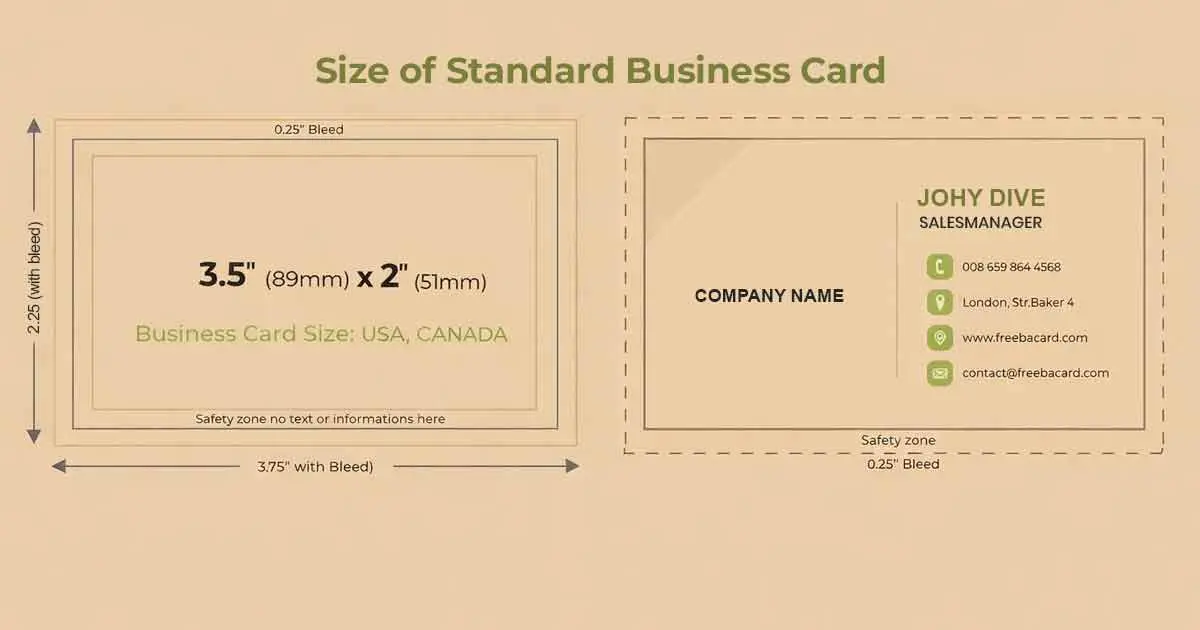
A business card is not just a piece of paper with your contact info slapped on it; it’s your brand’s handshake.
And
The size matters. Seriously.
So, what is the size of a standard business card? Great question. Before you hit print or start designing, it’s worth knowing what “standard” actually means.
Dimensions of a Typical Business Card Size
In the U.S., the size of a standard business card is 3.5 inches by 2 inches, roughly the same as a credit card. It’s compact and fits perfectly into wallets, cardholders, and even the tiniest of pockets.
That said, business card sizes aren’t set in stone.
While 3.5 x 2 inches is the go-to in the U.S. and Canada, other regions prefer different dimensions. In Europe, for example, cards tend to be slightly longer and narrower. Meanwhile, Asian countries might opt for taller formats. It all comes down to regional preferences and cultural nuances.
On top of that, your printer’s requirements can also influence your card’s final size. Bleed areas, trim lines, and safe zones all factor into the final design specs.
Standard Business Card Size in Pixels
If you’re designing a business card digitally, knowing the dimensions in pixels is just as important as knowing the physical size. However, the size of a standard business card in pixels typically depends on the resolution you’re working with.
For high-quality prints, the industry standard is 300 DPI (dots per inch). This resolution ensures your design comes out crisp, clear, and professional, not blurry or pixelated. To convert inches to pixels, you just multiply the inches by the DPI. So using the standard business card size of 3.5 inches by 2 inches, here’s how that breaks down:
- Width: 3.5 inches × 300 DPI = 1050 pixels
- Height: 2 inches × 300 DPI = 600 pixels
Let’s say you’re designing your card in Photoshop or Canva. Setting your canvas to 1050 by 600 pixels at 300 DPI will match the physical size perfectly, making your design print-ready. Just remember to leave space for bleed and trim, especially if your design goes edge to edge.
Business Card Options By Sizes and Shapes
Who says business cards all have to look the same?
Sure, the standard 3.5 x 2 inch rectangle is the classic go-to and for good reason. It’s universally recognized, easy to store, and plays well with wallets, cardholders, and even scanner apps.
But if you’re looking to stand out (without shouting), you’ve got options.
Square Business Cards
These cool little cards measure 2 x 2 inches and bring a modern, stylish twist to your branding. Think of them as the Instagram post of business cards. They’re great for creative professionals, designers, or anyone who wants a sleek, contemporary vibe.
Rounded Corner Cards
Same size as the standard (3.5 x 2 inches), but with softly rounded edges. It’s a small tweak, but it adds a touch of elegance that makes your card feel premium. These are popular in the creative industry, high-end services, or anywhere you want to say, “I pay attention to the details.”
Folded Business Cards
Now we’re talking versatility. Folded cards usually measure 3.5 x 4 inches (folded down to the standard 3.5 x 2), giving you double the space to play with. These work beautifully for mini menus, product feature lists, appointment reminders, or even a quick brand story. Real estate agents, salons, and boutique shops love this format.
Slim Business Cards
Sleek and minimal, these measure around 1.5 x 3.5 inches. They’re long, lean, and super sophisticated—perfect for luxury brands, fashion houses, or high-end consultants. They slip into a wallet like a charm and leave a lasting impression without saying too much.
How To Choose The Ideal Dimensions For Your Business Card
When it comes to picking the perfect size for your business card, the standard 3.5 x 2 inches is almost always a safe bet. It’s familiar, functional, and accepted pretty much everywhere, from trade shows to tucked-away cardholders. But “ideal” isn’t just about fitting into a wallet. It’s about balancing image quality, usability, and purpose.
If you’re designing your card for digital sharing, say, attaching it to emails or uploading to a website, then size in pixels matters just as much as physical dimensions. Go for high resolution (usually 300 DPI) to keep your design sharp, but avoid making the file size so heavy that it takes forever to load or send.
Your brand identity should also play a role in this decision. A minimalist luxury brand might lean into a slim or square design for a clean, polished look. Meanwhile, a creative agency or boutique business may benefit from a folded card that tells a bigger story with more space to play around.
In a Nutshell
The size of a standard business card is 3.5 x 2 inches, but that’s just the beginning. From sleek slim cards to bold square designs, there’s plenty of room to get creative.
FAQs
How to print multiple business cards on one sheet in Word?
Open Word and go to File > New, then search for a business card template. Once you’ve customized your design, Word will automatically arrange multiple cards on one sheet (usually 10 per page). Make sure your paper size matches your template, and choose “Print Multiple Pages Per Sheet” in the print settings for best results.
How to print business cards from Canva?
After designing your card in Canva, click “Share” > “Download”, and choose PDF Print for the highest quality. Make sure the crop marks and bleed option is checked. You can then print it at home using cardstock, or send the file to a professional printer for a cleaner finish.

Jennifer James
My specialty is developing cost-effective, attractive, and appropriate packaging for protecting products. I am working with the company to design custom packaging that meets the client’s requirements.